


Download Young’s On Tap – pub finder, Young’s pubs, book a table, menu browsing, Uber integration, open tab, DJ feature, rewards program, Young’s Day, seasonal offers
Overview
Young’s On Tap is a mobile application designed to enhance the pub experience for patrons of Young’s pubs across the UK. Developed by PepperHQ, the app positions itself as a digital companion for users seeking convenience, entertainment, and rewards while visiting their local Young’s venue. The primary purpose of the software is to simplify the process of locating, reserving, and enjoying a visit to one of over 180 Young’s pubs. It serves as a central hub for real-time access to menus, table booking, and seamless payment options, all integrated into a single interface.
The app targets casual diners, social drinkers, and regular pub-goers who value efficiency and personalized experiences. It is especially useful for users who prefer to avoid queues, manage group dining, or enjoy a more interactive evening with music and rewards. Real-world usage scenarios include planning a weekend outing with friends, booking a last-minute dinner reservation, or simply discovering a new pub in your neighborhood. The app’s integration with ride-sharing services like Uber further supports convenience for users traveling to or from venues. While the developer has not provided additional details about the company’s background or technical infrastructure, the app’s functionality suggests a focus on user-centric design and service optimization.
Key Features & Capabilities
- Pub Finder – Enables users to locate the nearest Young’s pub using GPS and display real-time availability, helping users make informed decisions based on proximity and current conditions.
- Table Booking – Allows users to reserve a table directly through the app, reducing wait times and improving visit planning efficiency.
- Menu Browsing – Offers digital access to full menus, including food, drinks, and special offers, with the ability to view detailed descriptions and pricing.
- Uber Integration – Provides a one-tap option to request a ride from the app, streamlining the journey to and from the pub.
- Open & Pay Tab – Lets users view all items ordered during their visit, split bills with friends, and settle payments from their table without visiting the bar.
- Tunes On Tap – Empowers users to act as a DJ by adding their favorite songs to a shared jukebox playlist, enhancing the social atmosphere.
- Rewards Program – Delivers exclusive offers such as free pints on Young’s Day and seasonal promotions, encouraging repeat visits and user engagement.
These features collectively support a seamless, interactive, and rewarding pub experience. For instance, a group of friends can book a table in advance, browse the menu together, add songs to the playlist, and settle the bill without leaving their seats. The integration of digital payments and real-time updates aligns with modern expectations for convenience and connectivity in hospitality services.
User Interface, Workflow & Performance
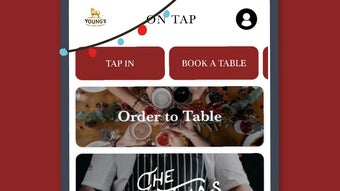
The user interface of Young’s On Tap appears to follow a clean, intuitive layout optimized for mobile use. Navigation is likely structured around core functions such as “Find a Pub,” “Book a Table,” “Menu,” and “My Tab,” with clear visual cues and accessible icons. The workflow is designed to minimize steps, allowing users to complete tasks like booking or paying with minimal taps, supporting the app’s claim of closing a tab in three easy taps.
While specific performance data was not provided, the app’s functionality suggests responsiveness in handling real-time interactions such as menu updates, booking confirmations, and payment processing. Stability is expected to be maintained through regular updates, particularly given the app’s active feature set. The developer did not specify resource usage details, so actual CPU or RAM behavior remains unknown. However, based on general mobile app behavior, performance is likely optimized for smooth operation on modern iOS and Android devices. Users can expect consistent performance during peak hours, though results may vary depending on network conditions and device capabilities.
Compatibility & System Requirements
Young’s On Tap is compatible with iOS and Android operating systems, supporting a broad range of mobile devices. The app version is 2.1.5, with a file size of 124.3 MB, indicating a moderate installation footprint. This size suggests the inclusion of multimedia assets such as images, audio files for the jukebox, and embedded maps.
Exact system requirements were not listed, so users should ensure their devices meet the minimum specifications for their respective platforms. The developer did not provide information on hardware requirements, such as RAM or processor speed. Compatibility information is limited to the operating systems mentioned. Users are advised to check their device’s app store for the latest compatibility details before installation.
Pros and Cons
Pros
- Free to download and use with no hidden costs.
- Comprehensive suite of features tailored to pub-goers.
- Seamless integration with Uber for convenient travel.
- Open tab functionality reduces wait times at the bar.
- Interactive Tunes On Tap feature enhances social engagement.
- Rewards program encourages regular use and loyalty.
Cons
- Available only on iOS and Android, excluding desktop users.
- Functionality is limited to Young’s pubs, reducing broader utility.
- Exact system requirements were not specified.
- Relies on internet connectivity for full functionality.
- App size is relatively large for a single-purpose tool.
FAQ Section
Is Young’s On Tap available for Windows or Mac?
Young’s On Tap is currently available only on iOS and Android devices. There is no desktop version available at this time.
Is the app safe to use and secure?
The app is developed by PepperHQ and distributed through official app stores. While specific security measures were not detailed, standard app store vetting processes help ensure a baseline level of safety.
How often are updates released?
Updates are released periodically to improve functionality, fix bugs, and add new features. The current version is 2.1.5, released on March 15, 2024.
Does the app require a subscription or in-app purchases?
Young’s On Tap is free to download and use. There are no subscription fees or mandatory in-app purchases. However, users may receive promotional offers or rewards based on usage.
Can I use the app offline?
Most features, including menu browsing and tab management, require an active internet connection. Offline functionality is limited and not explicitly supported.
Final Thoughts + CTA
Young’s On Tap delivers a modern, feature-rich experience tailored to the needs of pub enthusiasts. With its combination of practical tools—table booking, digital menus, and seamless payments—and unique social elements like the DJ feature and rewards program, it stands out in the lifestyle category. The app effectively bridges the gap between physical venues and digital convenience, offering real value for users who frequent Young’s pubs.
While its scope is limited to a single pub chain, the depth of integration and user-focused design make it a standout choice for loyal patrons. The free pricing model further enhances its appeal. For anyone looking to streamline their pub visits, enhance social interactions, and enjoy exclusive perks, Young’s On Tap is a compelling option.
Download Young’s On Tap now







